
- Employee Handbook
- HR
- Operations
- Templates
Employee Handbook Software: 7 Best Tools + Free Template (2026)
Compare 7 employee handbook software tools on versioning, sign-off, legal updates and real pricing, plus a free, copyable employee handbook template.
Fylos Team14 min read

Employee handbook software helps you write, publish, update and track your company’s policies in one place, instead of a 40-page PDF nobody opens. For a 20–500 person company, the best tool is the one that keeps the handbook current, makes it easy to find answers, and shows who has acknowledged which version.
The typical handbook is neither current nor read. In Brightmine’s 2025 employee handbook survey, fewer than half (48%) of HR professionals felt very confident that their handbook reflects all current employment law, and 62% review it for compliance once a year or less. Getting people to read it is the other half of the problem: in an earlier XpertHR survey, 66% of 619 US employers found it challenging to get employees to read the handbook (2020).
This guide compares seven tools with real pricing and honest weaknesses. It ends with a free, copyable employee handbook template you can use in any tool, including Google Docs.
Disclosure: Fylos is our product. Pricing and feature claims about other tools link to the vendors’ own pages, checked on September 26, 2026.
Key Takeaways
- Dedicated handbook tools (AirMason, Blissbook, SHRM’s builder) are strongest on US legal content and law-change updates. Wikis (Notion) are flexible but have no built-in sign-off tracking.
- For 20–500 person teams, look at five things: easy editing with version history, acknowledgment tracking, findability, legal updates if you need them, and pricing at your headcount.
- Fylos fits teams that want the handbook, policy signing and AI answers with sources in one EU-hosted workspace. It doesn’t include legal policy content, so pair it with your lawyer or a legal template.
- Use the free template at the end of this article as your starting outline, and have it reviewed by an employment lawyer in each country or state where you employ people.
Table of contents
What is employee handbook software?
Employee handbook software is a tool for creating, publishing and maintaining the policies, benefits and “how we work” information every employee needs. Compared with a Word document or PDF, it usually adds:
- Online editing and version history, so there’s one current version and a record of what changed.
- Distribution and acknowledgment, so you can see who has read and signed which version.
- Search, and increasingly AI answers, so people find the right rule without scrolling.
- Templates and, in some tools, legal content that is updated when laws change.
There are three types. Dedicated handbook builders (AirMason, Blissbook) focus on the handbook itself. Legal content services (SHRM’s builder) focus on getting the policy text right. Workspaces and wikis (Fylos, Notion, Trainual) put the handbook next to the rest of your company knowledge.
Handbooks are hard to keep current and hard to get read. Sources: XpertHR survey of 619 US employers via HR Dive (2020); Brightmine 2025 Employee Handbooks survey via HR Daily Advisor (2025).
What to look for in employee handbook software
For a 20–500 person company, these five criteria separate a handbook people use from a PDF in a drawer:
- Easy editing with version history. If updating a policy takes a designer or a ticket, it won’t happen. You also need to see which version was live on a given date.
- Acknowledgment tracking. You should be able to send a policy for sign-off and see who hasn’t signed. Our guide on how to prove employees read a policy explains what a solid record contains.
- Findability. People rarely read a handbook front to back. They search for one answer: “How many vacation days do I get?”
- Legal content and updates, if you don’t have in-house legal support. This matters most for US companies with employees in several states.
- Pricing at your headcount. Handbook tools price per employee band, per user or as a flat fee, so compare at your actual size.
The 7 best employee handbook software tools at a glance
| Tool | Type | Sign-off tracking | Legal content/updates | Starting price (public) |
|---|---|---|---|---|
| Fylos | Handbook + knowledge base | Yes, document signing (Growth) | No | $5 per user/month (annual) |
| AirMason | Dedicated builder | Yes, e-signatures + reminders | Yes, US (50 states) | $999/year (1–99 employees) |
| Blissbook | Dedicated builder | Yes, e-signatures + reporting | Add-on, from $49/month (1 state) | $249/month (shown for 301–400 employees) |
| Trainual | SOPs + training + handbook | Yes (capped on Pro) | None found | Quote only |
| Notion | Wiki / DIY | No | No | Free plan; Plus €9.50, Business €19.50 per member/month (EU) |
| Connecteam | Frontline app | Yes, read and sign | None found | Free up to 10 users; paid from $29/month |
| SHRM Handbook Builder | Legal content service | Not listed | Yes, US federal + 50 states | $499/year |
1. Fylos: best for a handbook people actually use
Fylos puts your employee handbook in the same workspace as the rest of your company knowledge, so a question like “can I carry over vacation days?” gets a direct answer from the handbook, with the source shown in a side panel.
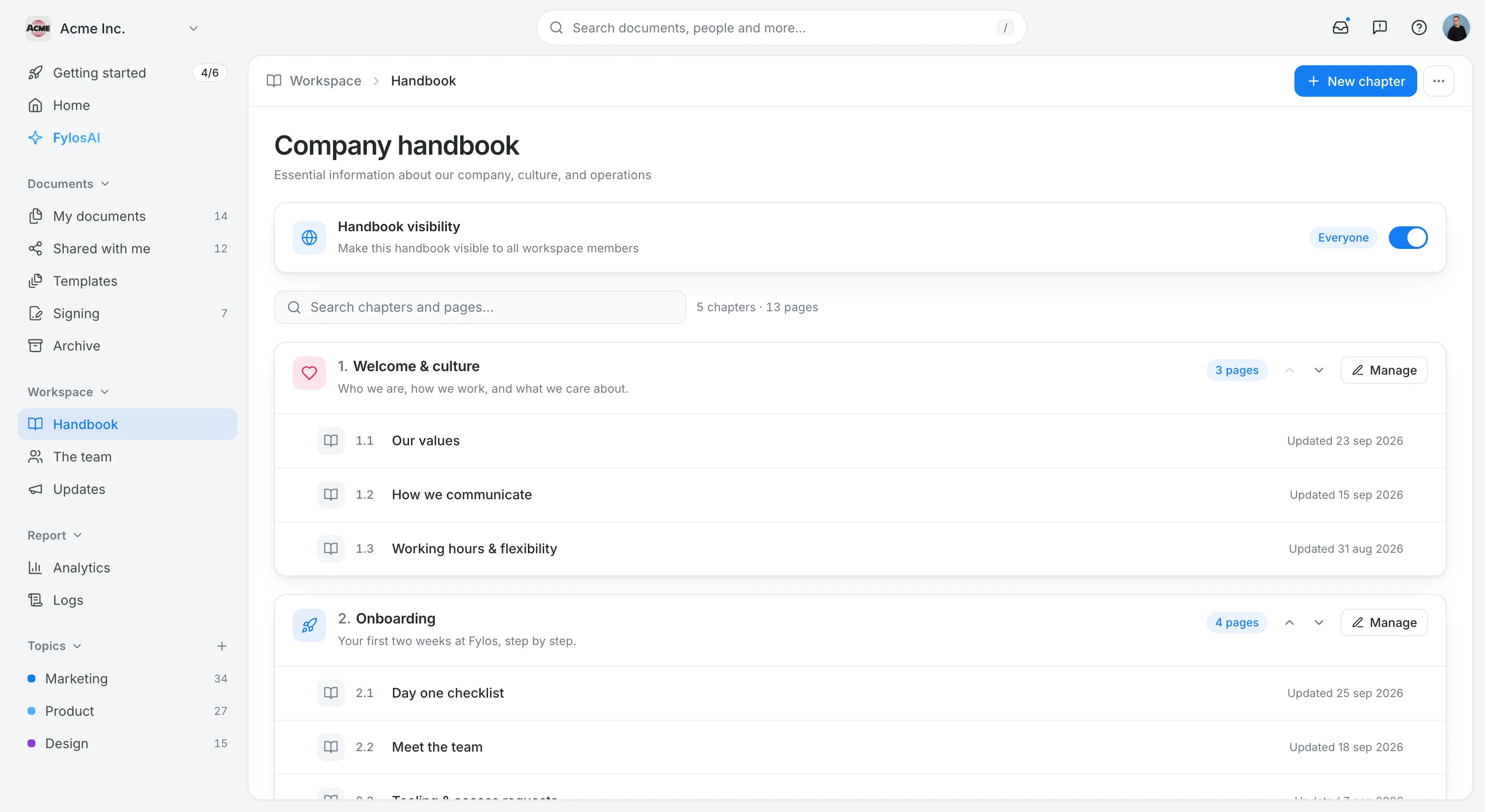
Why it’s great: The handbook (the Company Hub) and AI search are included in every plan, with real-time editing, comments and version history. On the Growth plan, you can send a policy for signature and track every step without leaving the workspace. Review reminders and stale-content alerts help owners keep policies current. Data is hosted in the EU and never used to train external AI models.
Best for: 20–500 person companies, especially in Europe, that want one place for the handbook, policy sign-off and answers to everyday questions.
Honest weakness: Fylos doesn’t provide legal policy text or law-change alerts. Write your policies with your lawyer or a legal template (like the one below), then manage them in Fylos. Per-user pricing also means a company that only needs a handbook may pay more than with a flat-fee builder.
Pricing: Basic from $5 per user per month billed annually ($7 monthly). Growth, which adds document signing, is $10 ($14 monthly). 15-day free trial, no credit card needed (Fylos pricing).
2. AirMason: best dedicated builder for smaller US teams
AirMason is a dedicated handbook builder with clear public pricing for smaller companies. It includes templates, e-signatures, automatic versioning, approval workflows and signature reminders (AirMason pricing).
Why it’s great: Its homepage promises AI monitoring of law changes in all 50 US states with attorney-reviewed updates, and an AI assistant (AirAssist) that answers employee questions.
Best for: US companies of 20–199 employees that want a polished handbook without building it themselves.
Honest weakness: The legal monitoring is US-focused, so UK and EU teams get less value from it.
Pricing: Startup (1–99 employees) $999 per year, or $149 per month billed monthly. Small Business (100–199) $1,499 per year. Enterprise (200+) is quoted.
3. Blissbook: best for compliance-heavy US organizations
Blissbook focuses on handbooks and policy management, with e-signature collection and reporting, templates, and more than 80 HRIS integrations (Blissbook pricing).
Why it’s great: The PRO plan adds approval workflows, extended version history and paper signature tracking, which is useful if part of your workforce doesn’t have a company login.
Best for: US organizations of roughly 100–500+ employees with multi-state compliance needs.
Honest weakness: The pricing page shows $249 per month for 301–400 employees, so confirm the price for your band, and the extras add up. Labor law updates start at $49 per month for one state and go up from there, implementation starts at $750, and a new or revised handbook starts at $995.
Pricing: $249 per month billed annually (shown for 301–400 employees), PRO $349 per month.
4. Trainual: best when your handbook is part of training
Trainual combines standard operating procedures, training and your handbook in one platform, with 500+ customizable templates and AI-assisted writing (Trainual pricing).
Why it’s great: If your “handbook” is really about how to do the job, Trainual connects policies to processes and training.
Best for: Process-heavy companies of 20–200 people that want onboarding and SOPs in the same tool.
Honest weakness: We found no legal policy content or law-change alerts. Version history is limited to 30 days on Core and 90 days on Pro (unlimited on Premium), and e-signatures are capped at 300 per year on Pro.
Pricing: No public prices. The pricing page lists the Core, Pro, Premium and Enterprise plans without dollar amounts.
5. Notion: best DIY option if you already use it
Many startups write their handbook as a set of Notion pages. It’s flexible, well designed and probably already in your stack. On Business and Enterprise plans, verified pages show a check mark with an optional expiry date, which helps signal which policies are current.
Best for: Teams of 20–200 people who already work in Notion and don’t need formal sign-off.
Honest weakness: There’s no built-in acknowledgment or e-signature tracking, and no legal content. Page history is 7 days on Free, 30 on Plus and 90 on Business (unlimited on Enterprise).
Pricing: Plus is €9.50 and Business €19.50 per member per month in the EU (Notion pricing).
6. Connecteam: best for frontline and shift-based teams
Connecteam is an all-in-one app for deskless teams, with a knowledge base and “read and sign” forms that track completion. Every form entry generates a PDF copy.
Best for: Retail, hospitality, construction and field teams where most employees work from their phones.
Honest weakness: The handbook is a side feature, not a dedicated editor, and we found no legal policy updates.
Pricing: Free for up to 10 users. Paid hubs cost $29, $49 or $99 per month for the first 30 users (Connecteam pricing).
7. SHRM Employee Handbook Builder: best for US legal content
SHRM’s builder is less a platform and more a source of legally reviewed policy text. It covers federal law and all 50 states, with legal review by the law firm Jackson Lewis and automatic updates (SHRM).
Best for: US small businesses that need trustworthy policy wording and plan to distribute it through another tool.
Honest weakness: It’s US-only and focused on content. We found no sign-off tracking or search features listed. You’ll likely pair it with a tool like Fylos, AirMason or Notion to publish it and collect sign-off.
Pricing: $499 per year.
What must an employee handbook include?
In most places, having a handbook isn’t a legal requirement in itself. But once you have one, some rules apply to what’s in it. This is general information, not legal advice, and reflects the law as of September 2026.
United States
- FMLA notice. If you’re an FMLA-covered employer with eligible employees and your handbook covers benefits or leave, you must include the FMLA general notice in it (29 CFR 825.300(a)(3)).
- Recommended core sections. SHRM recommends a statement that the handbook isn’t a contract, at-will language where applicable, EEO, anti-harassment with a complaint process, leave, pay and timekeeping, benefits and work rules. It also advises reviewing the handbook at least once a year.
- Work rules and the NLRB. Under the NLRB’s 2023 Stericycle standard, a work rule can be presumptively unlawful if it could reasonably chill employees’ rights to act together, in unionized and non-union workplaces alike. An employer can rebut that by showing a legitimate and substantial business interest that a narrower rule couldn’t serve. As of April 2026, SHRM reports that Stericycle remains in place, although it may be revisited. Review broad rules on confidentiality, social media and recording.
- State laws. Some states require specific written policies, such as harassment prevention policies in New York and California. Leave, pregnancy accommodation and workplace safety rules also vary by state, so add state addenda where you have employees.
United Kingdom
- Written statement vs handbook. Employers must give a written statement of employment particulars: the principal statement on day one and the wider statement within two months. Some day-one details, such as sick pay and other paid leave, can be given in a separate, accessible document like the company intranet, so your handbook can do real work here.
- Disciplinary and grievance rules. The Acas Code says these rules should be set down in writing, be specific and clear.
EU and elsewhere: requirements differ by country, so have each country section checked locally.
Free employee handbook template
Copy this outline into your handbook tool or a Google Doc and replace the bracketed text. Keep each section short, and start with the answer people are looking for. Have the final version reviewed by an employment lawyer for every country or state where you employ people.
EMPLOYEE HANDBOOK — [Company name]
Version [1.0] · Effective [date] · Owner: [name, role] · Next review: [date]

1. WELCOME
   - Who we are, our mission and values (half a page, max)
   - Who to ask when this handbook doesn't answer your question: [name / channel]

2. HOW TO USE THIS HANDBOOK
   - [Adjust per jurisdiction] This handbook is not a contract of employment. [Company] may update it;
     we'll tell you when we do and ask you to acknowledge material changes.
   - [US] At-will employment statement, where applicable.
   - Where local law or your contract gives you more rights, those apply.

3. EQUAL OPPORTUNITY AND ANTI-HARASSMENT
   - Our commitment and what's not tolerated
   - How to report a concern (at least two routes, e.g. manager or HR/[name])
   - No retaliation for reporting in good faith

4. ACCOMMODATIONS
   - How to request an adjustment (disability, pregnancy, religion)

5. WORKING HOURS, PAY AND TIMEKEEPING
   - Standard hours, breaks, overtime
   - Pay dates, expenses: how to submit and approval limits

6. TIME OFF AND LEAVE
   - Vacation/holiday allowance, how to request, carry-over rules
   - Public holidays
   - Sick leave and how to report absence
   - Parental and family leave
   - [US, if covered] FMLA general notice
   - [State/country addenda for local leave rules]

7. BENEFITS
   - Pension/retirement, health, learning budget, equipment

8. WHERE AND HOW WE WORK
   - Office, hybrid and remote work rules; working from abroad
   - Travel

9. CONDUCT AND WORK RULES
   - Code of conduct, conflicts of interest, gifts
   - Social media and confidentiality
     [US: check broad rules against current NLRB standards]

10. IT, SECURITY AND DATA PROTECTION
    - Acceptable use of devices and accounts
    - Password and security basics; how to report an incident
    - How we handle employee personal data [UK/EU: link to privacy notice]

11. HEALTH, SAFETY AND WELLBEING
    - Reporting accidents and hazards; emergency contacts

12. DISCIPLINE AND GRIEVANCES
    - Disciplinary procedure (written, specific and clear)
    - How to raise a grievance and appeal

13. LEAVING THE COMPANY
    - Notice periods, returning equipment, final pay, references

14. COUNTRY AND STATE ADDENDA
    - [One short section per location with local rules]

15. ACKNOWLEDGMENT
    "I confirm that I have received and read the [Company] Employee Handbook,
    version [x], effective [date], and understand that I am expected to follow it.
    Name: ______  Date: ______  Signature: ______"
Two tips: add a version number and an owner to every section, and split long policies such as IT security into their own documents that the handbook links to. That makes updates and sign-off far easier.
Frequently asked questions
Is an employee handbook legally required?
Generally not by itself, but many rules affect what goes in one once you have it. In the US, for example, FMLA-covered employers with eligible employees must include the FMLA notice in a handbook that covers benefits or leave, and some states require specific written policies such as harassment prevention. In the UK, disciplinary and grievance rules should be in writing, and some written-statement details can be provided through a handbook or intranet.
How often should you update an employee handbook?
At least once a year, as SHRM recommends, and whenever a law or a policy changes. Every material change should get a new version number and, ideally, a new acknowledgment from employees.
Should the handbook be a separate tool or part of our knowledge base?
If your main goal is legal content for many US states, a dedicated builder or SHRM’s service makes sense. If your main problem is that people can’t find answers and keep asking HR, keep the handbook where people already look for information. See our guide to the best AI knowledge base tools and our tips for when employees keep asking the same questions.
How do we get employees to acknowledge the handbook?
Send it to each person with a clear acknowledgment line tied to the version, set a deadline, and follow up with reminders. Our guide to policy acknowledgment software compares the options.
Which employee handbook software should you choose?
- Choose Fylos if you want the handbook, policy signing and AI answers with sources in one EU-hosted workspace, and write the policy text with your lawyer.
- Choose AirMason or Blissbook if you’re a US company that wants a dedicated builder with legal updates.
- Choose the SHRM builder if you mainly need reliable US policy wording.
- Choose Notion or Connecteam if you already use them and formal sign-off isn’t a priority, or your team works mostly on phones.
Want a handbook your team actually uses? Try Fylos free for 15 days and paste in the template above. No credit card needed.